Restory.pics vs FlexClip 2026: Why Restory Wins for AI Photo Restoration
January 2026: Comprehensive comparison of Restory.pics vs FlexClip. 55% cheaper for dedicated photo restoration.
Mark Tate
AI Video & Image Specialist
Share

Restory.pics vs FlexClip 2026: Why Restory Wins for AI Photo Restoration
Comparing Restory.pics and FlexClip for photo restoration? While FlexClip is primarily a video creation platform with AI photo tools added, Restory.pics is a dedicated photo restoration specialist. This comparison reveals why focused expertise beats multi-purpose tools for restoring your precious memories.
Quick Verdict: Restory.pics Wins for Restoration
For dedicated photo restoration, Restory.pics offers significantly better value. Here's why:
- 55% Cheaper: $8.99/mo vs FlexClip's $19.99/mo
- Dedicated Restoration Focus vs Video Editor with AI Add-ons
- Gallery Storage with Folders (FlexClip lacks this)
- Era-Accurate AI Training (1840-1990)
- Video Animation from Restored Photos
- No Watermarks on Free Exports
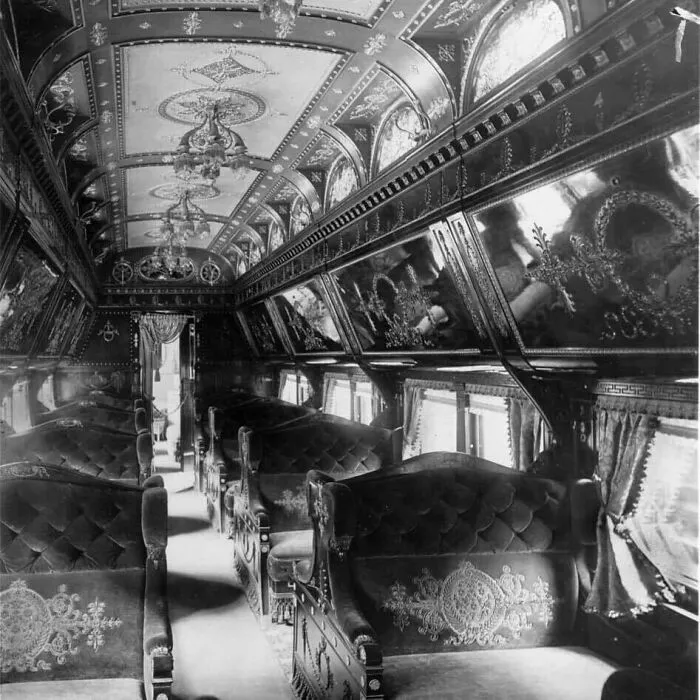
See Restory's Detail Preservation in Action
Watch how Restory preserves intricate details while adding stunning colorization to vintage interiors.
 Before
After
Before
After
Ornate vintage train car interior colorized with stunning detail preservation by Restory's AI
Feature Comparison at a Glance
| Feature | Restory.pics | FlexClip |
|---|---|---|
| Primary Focus | ✅ Photo restoration specialist | ⚠️ Video editor with AI tools |
| AI Photo Restoration | ✅ Era-accurate (1840-1990) | ✅ AI Old Photo Restoration |
| AI Colorization | ✅ Period-appropriate | ✅ AI Photo Colorizer |
| AI Upscaling | ✅ 4K with face preservation | ✅ AI Image Upscaler |
| Gallery Storage | ✅ Cloud with folders | ❌ No photo gallery |
| Video Animation | ✅ From restored photos | ❌ Not for restoration |
| Batch Processing | ✅ Up to 10 photos | ⚠️ Limited |
| Video Editing | ❌ Photo-focused | ✅ Full video suite |
| Free Tier Watermarks | ✅ No watermarks | ❌ Watermarks on videos |
| Starting Price | ✅ $8.99/month | ❌ $19.99/month |
1. The Price Difference: 55% Savings
The most striking difference is pricing. FlexClip starts at $19.99/month while Restory starts at $8.99/month - that's 55% savings for dedicated photo restoration.
Restory.pics Pricing
- Free Trial: 1 credit, no watermarks
- Starter: $8.99/month - 25 credits
- Memory Keeper: $23.99/month - 200 credits
- Archive Pro: $199.99/year - 1,200 credits
FlexClip Pricing
- Free: Watermarks, basic features
- Premium: From $19.99/month
- Video focus: Photo restoration is secondary
- Storage limits: Based on plan
2. FlexClip's Free Tier Limitations
FlexClip's free version has significant limitations:
Restory's free trial gives you one full-quality restoration with no watermarks, letting you test before committing.
3. Focus: Video Editor vs Photo Specialist
FlexClip is fundamentally a video creation platform. Photo restoration is just one of many AI tools they've added. Restory is built from the ground up for photo restoration.
FlexClip AI Tools (Add-ons)
- AI Old Photo Restoration
- AI Photo Colorizer
- AI Image Upscaler
- AI Image Extender
- AI Face Swap
Photo tools are secondary features in a video-focused platform.
Restory.pics Focus (Core)
- Era-Accurate AI (trained on 1840-1990 photos)
- Six category optimization
- Gallery with folder organization
- Video animation FROM restored photos
- Bulk processing for collections
Everything built for photo restoration excellence.
4. Exclusive Restory Features
Gallery Organization (Restory Exclusive)
- Secure cloud storage with 256-bit encryption
- Custom folders for different collections
- Before/After comparison views
- Timeline view for chronological browsing
- Easy sharing with family
Video Animation from Restored Photos
- Transform restored photos into lifelike videos
- Make loved ones hug, wave, or smile
- Perfect for sharing memories
Era-Accurate Restoration
- AI trained on photos from 1840-1990
- Period-appropriate color palettes
- Handles up to 80% damaged photos
5. When to Choose Each
Choose Restory.pics If:
- You specifically need photo restoration
- You want to organize a family photo archive
- You need era-accurate colorization
- You want video animation from restored photos
- You want to save 55% vs FlexClip
Choose FlexClip If:
- You primarily need video editing
- You create video content regularly
- Photo restoration is a minor use case
- You need video templates and effects
Frequently Asked Questions
Q: Isn't FlexClip better because it has more tools?
More tools doesn't mean better for your specific need. If you need photo restoration, a specialist tool like Restory delivers better results at 55% lower cost than FlexClip's video-focused platform.
Q: Does FlexClip have better AI?
FlexClip has good AI tools, but they're designed as add-ons to a video platform. Restory's AI is specifically trained on historical photos from 1840-1990 for superior restoration accuracy.
Q: Can I organize my restored photos on FlexClip?
FlexClip is designed for video projects, not photo archival. Restory offers dedicated gallery storage with folders, tags, and timeline views.
Q: Which is better for genealogy projects?
Restory.pics, without question. Gallery organization, bulk processing, and era-accurate AI make it ideal for family history work.
Conclusion: Specialist Beats Multi-Tool
FlexClip is a capable video editor with AI photo tools added. But for dedicated photo restoration, Restory's specialized focus, gallery organization, and 55% lower pricing make it the clear winner.
Final Verdict: Choose Restory.pics for Restoration
- 55% cheaper than FlexClip
- Dedicated photo restoration specialist
- Gallery storage with folders
- No watermarks on free trial
- Era-accurate AI (1840-1990)
- Video animation from restored photos
Why pay video editor prices for photo restoration?